Following below manual, you can easily connect with YieldPlanet one of the world's largest OTAs.
Connecting Expedia to YieldPlanet
In order to connect Expedia, please follow below steps:
- Log into your Expedia Partner Central
-
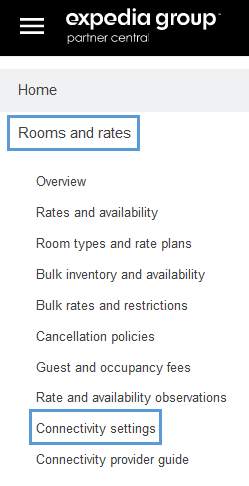
Click Rooms and Rates Connectivity Settings
- Choose YieldPlanet as your channel manager provider
-
Choose the connection type
Tip:
If you want to activate a 1-way connection, please start with Availability and Rates to avoid any reservation with missing room/rate plan to be mapped.
Choose Booking Retrieval option once Expedia is mapped in YieldPlanet.
Retrieving Expedia rooms and rate plans in YieldPlanet
See our article on retrieving parter rooms and rate plans by clicking link below:
Mapping Expedia in YieldPlanet
See our article on mapping by clicking link below:
Additional Notes on Expedia Mapping
Expedia rate plans will download with some additional information included in the names. These are important to know in order to create proper mapping for this partner.
Here are few examples:
- Room Only (Studio [201163079])(Standalone, HotelCollect, SellLAR, Standalone) [398192772A]
- Room Only (Studio [201163079])(Standalone, ExpediaCollect, SellLAR, Derived: Do not map for distribution) [398192772]
- Room Only (Studio [201163079])(Package, ExpediaCollect, SellLAR, Derived: Do not map for distribution) [398192833]
First, you need to match particular rate plan instance with correct room category visible in first bracket. In example above, both Standard rate instances are ment to be mapped with Single Room. Non refundable however is only ment for Double Room.
Second, at the end of each rate plan there is a Standalone, HotelCollect, SellLAR, Standalone, Standalone, ExpediaCollect, SellLAR, Derived or Package, ExpediaCollect, SellLAR, Derived flag. The only one marked for distribution is HotelCollect, SellLAR, Standalone. Both Linked/Derived should be mapped with all data types distribution checked off. These are only mapped for booking retrieval. See Screenshot below:
Activating Expedia in YieldPlanet
Go to dashboard and click yellow Expedia icon located in Channel Health section.

It will turn blue indicating that channel is activated.
