HRS company’s international management team brings together extensive expertise and market know how. They use their decades of combined experience in the corporate travel and hotel industries, and from around the globe, to drive the company into the future.
Connecting HRS to YieldPlanet
- Log into yourHRS.com acount
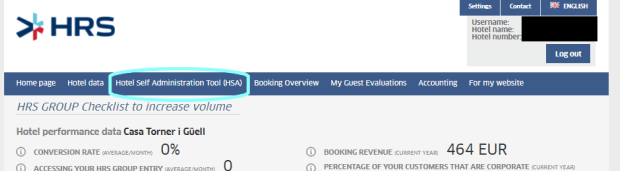
- Click Hotel self administration tool (HSA) then log in:
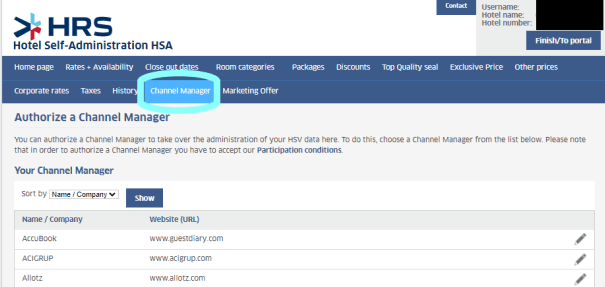
- Click Channel Manager and select YieldPlanet:
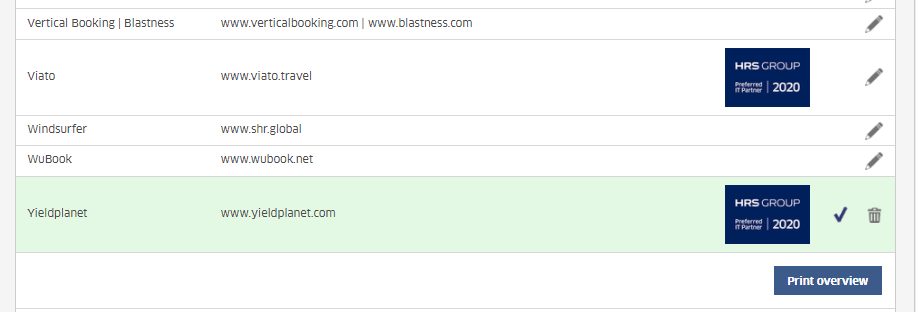
- Notify YieldPlanet support team about the switching.
Retrieving HRS rooms and rate plans in YieldPlanet
See our article on retrieving parter rooms and rate plans by clicking link below:
Note:
Triple Room is doubleExtraBed1, Quadruple Room is DoubleExtraBed2.
Mapping HRS in YieldPlanet
See our article on mapping by clicking link below:
Note:
Single and Double room can be matched with HRS Rate, Special Rate, Trade Rate, Weekend Rate, Season Rate and Hot Deal.
All other room types can be matched with Category rate plan only.
Activating HRS in YieldPlanet
Go to dashboard and click yellow HRS icon located in Channel Healthsection.

It will turn blue indicating that channel is activated.
