Connecting Ostrovok to YieldPlanet
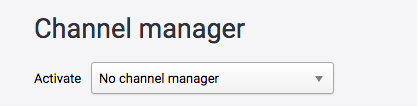
- Login to your account on Ostrovok
- Go to Hotel General Info
- Choose YieldPlanetas your channel manager from the rop-down menu:
Retrieving Ostrovok rooms and rate plans
Read our article on retrieving parter rooms and rate plans by clicking the below link:
Info:
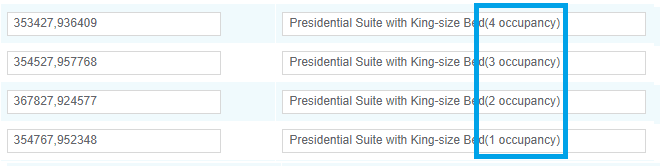
Ostrovok operates on Occupancy Based Pricing. We always download all occupancy options for each room type:
Mapping Ostrovok
Read our article on mapping by clicking the below link:
Important:
Each room type has its own rate plans. Please be aware to map only proper rate plans for each room type.
Activating Ostrovok
Go to dashboard and click yellow Ostrovok icon located in Channel Health section.

It will turn blue indicating that channel is activated.
