Configuration and Mapping Guide
This guide provides the technical steps required to integrate Expedia Partner Central with the YieldPlanet Channel Manager.
Core Integration Steps (Expedia Partner Central)
To establish the initial connection between the OTA and the Channel Manager, perform the following steps within the Expedia portal:
- Log in: Access the Expedia Partner Central dashboard.
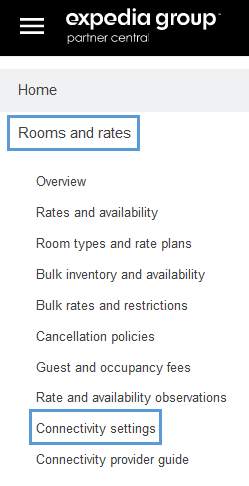
- Connectivity Settings: Navigate to Rooms and Rates > Connectivity Settings.
- Provider Selection: Select YieldPlanet as the designated channel manager provider.
- Connection Type: Select the preferred connection type (1-way or 2-way).
Technical Tip: Activation Sequence
For 1-way connections, activate Availability and Rates first. This prevents reservations from failing due to unmapped room or rate plans. Only select the Booking Retrieval option after mapping is finalized within YieldPlanet.
YieldPlanet Configuration Workflow
Once the channel manager provider is selected in Expedia Partner Central, the following configuration steps must be executed within YieldPlanet to enable synchronization:
- Configure Partner Credentials: Navigate to the partner credential section in YieldPlanet and enter your Expedia Hotel ID. This credential is required to authorize the data bridge.
- Room Retrieval: Download and import the active Expedia rooms and rate plans into the YieldPlanet partners section. (Note: This step will fail if the Expedia Hotel ID is not correctly configured in Step 1).
- Mapping: Match the retrieved Expedia room types and rate plans to their corresponding YieldPlanet inventory equivalents.
Expedia Rate Plan Naming Conventions
Expedia rate plans include specific metadata tags in their titles. Accurate mapping requires identifying these suffixes:
Example Structure
- Room Only (Studio [ID])(Standalone, HotelCollect, SellLAR, Standalone) [123456789A]
- Room Only (Studio [ID])(Standalone, ExpediaCollect, SellLAR, Derived: Do not map for distribution) [123456789]
- Room Only (Studio [ID])(Package, ExpediaCollect, SellLAR, Derived: Do not map for distribution) [987654321]
Validation Rules
- Room Matching: Verify the room category in the first bracket matches the YieldPlanet room ID.
- Distribution Flags:
- HotelCollect, SellLAR, Standalone: The primary rate plan intended for active distribution.
HotelCollect, SellLAR, Linked / Derived: These are secondary plans. Requirement: Map these for booking retrieval only; ensure all "data types distribution" checkboxes are unchecked to avoid synchronization errors.
Channel Activation
To finalize the connection and begin data transmission:
- Navigate to the YieldPlanet Dashboard.
- Locate the Channel Health section.
- Click the Yellow Expedia Icon.
- The icon will turn Blue, indicating the channel is live and active.
Key Terms Summary
| Term | Definition |
|---|---|
| ExpediaCollect | Payment is collected by Expedia at the time of booking. |
| HotelCollect | Payment is collected by the hotel at check-in/out. |
| SellLAR, Standalone | The rate plan designated for active price and availability updates. |
| Derived/Linked | Rates calculated based on a parent rate; mapped primarily for reservation delivery. |
| 1-Way Connection | Data flows in one direction (usually from Channel Manager to OTA). |