Overbooking Pooling allows to set up how overbooked rooms should be reassigned from other categories. It allows to overbook room categories without risk of overbooking on hotel level.
When minus availability is received from PMS on one room category, availability from other categories is deducted to compensate overbooking.
To set up overbooking pooling, login to Price Optimizer and
- Go to Configuration > Rules > Overbooking Pooling

- Define weights how overbooking of given category should be compensated from other categories and if any minimum reserve should be left
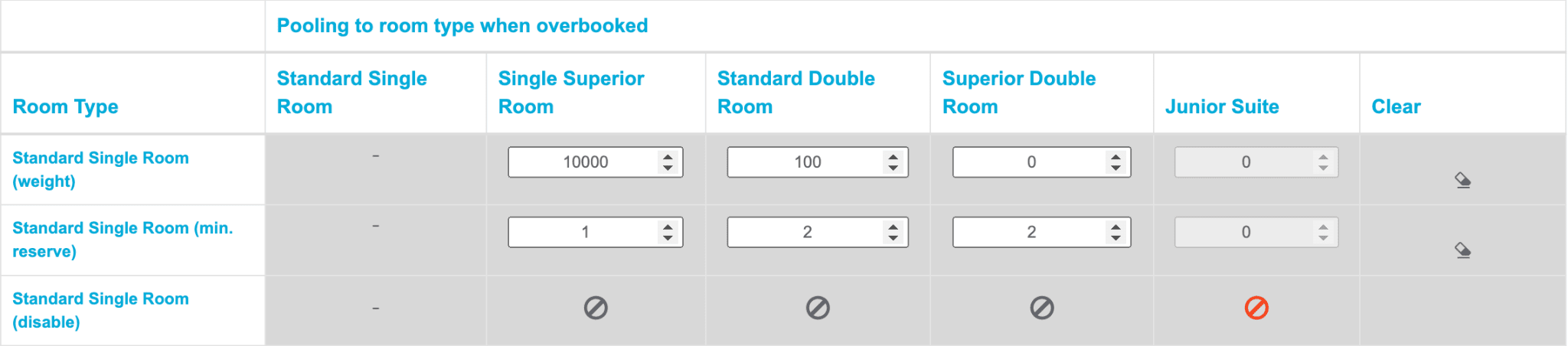
If a room type from the left column is overbooked, the redistribution is completed to the room types in the columns. The re-assignment is done proportionally to the weight for the different room categories (“weight row”) while leaving the minimum reserve for each room category (“reserve row”). If re-assignment is disabled (“disable row”) - overbookings are never compensated from disabled category.
Important:
Overbooking pooling settings should be in-line with virtual rooms settings. It is important for proper calculation of how many virtual rooms are in fact available for booking.