Overview
This article provides technical and procedural instructions for connecting, mapping, and activating Airbnb listings within the YieldPlanet Channel Manager system. This integration allows property managers to automatically synchronize rates, availability, minimum stay constraints, and Closed to Arrival (CTA) restrictions.
Core Warnings, Limitations & Exceptions
⚠️ CRITICAL LIMITATION: Co-Host Restrictions Airbnb listings managed or owned via an Airbnb Co-Host profile cannot be connected via API integration to YieldPlanet.
⚠️ CRITICAL LIMITATION: Pricing Controls Property managers cannot utilize Airbnb's "Smart Pricing" (referred to in system logs as Clever Prices). If active, updates will fail with a distribution error.
⛔ DATA DELAY NOTICE: Propagation Window Price synchronization does not become instantaneous upon setup. It requires approximately one hour (60 minutes) for API permissions to fully propagate across systems. Early synchronization attempts during this window will trigger a permission error.
Prerequisites
Before initiating the connection inside YieldPlanet, the primary Airbnb Host account must fulfill the following structural requirements within the Airbnb Extranet:
Host Profile Verification: The primary Host profile must have a verified Government ID, a verified email address, a verified phone number, and a completed profile picture.
Content Minimums: Each listing must contain an active, thorough text description and a minimum of three (3) high-quality photographs.
HostID Extraction: Property managers must retrieve their unique numeric account identifier directly from Airbnb:
Log in to the primary Airbnb account.
Click on your user avatar image.
Look at your browser’s URL bar. Extract the numeric string located at the end of the web address.
Example: In the URL
https://www.airbnb.com/users/show/123456789, the HostID is123456789.
Steps
Step 1: Authorizing YieldPlanet within Airbnb
This process establishes secure API communications between your YieldPlanet property management setup and the Airbnb network.
Log in to the YieldPlanet platform and navigate to Setup > Partners.
Locate the Airbnb row entry and click Edit.
Input your extracted numeric Airbnb HostID directly into the
Hotel IDfield.Click the button labeled Authorize YP as Channel Manager.
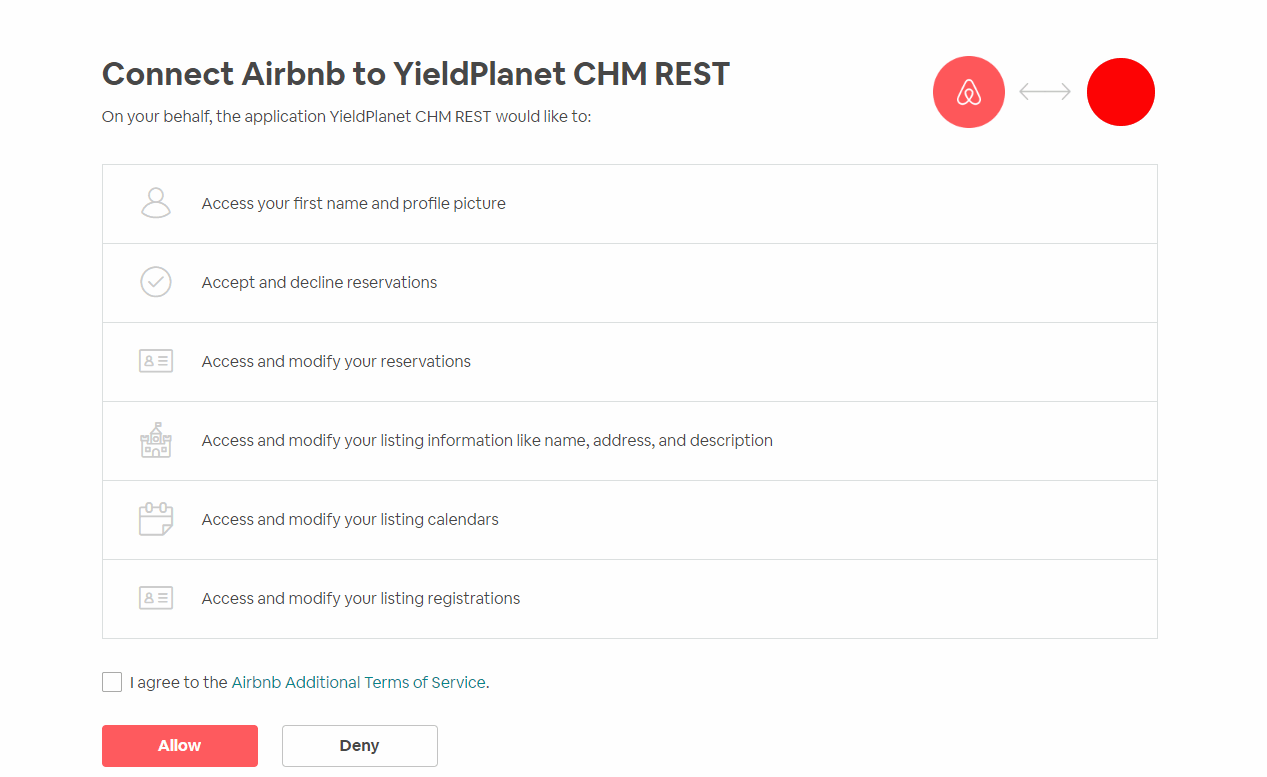
The system will redirect you to the Airbnb website. If prompted, log into the primary Host account.
Review and accept the Airbnb Additional Terms of Service, then click Allow to grant access permissions.
Step 2: Retrieving Airbnb Listings
YieldPlanet must download your live digital catalog before room mapping can occur.
Navigate to the Partners management screen via the YieldPlanet sidebar menu.
Select Airbnb from your active distribution channels list.
Click Fetch/Retrieve Rooms and Rate. By default, the system establishes a standard rate code (ID. 1) along with live property configurations.
Step 3: Mapping and Double-Authorization Validation
Airbnb requires an explicit, secondary verification action to link individual mapped entities securely.
Navigate to Setup > Partners > Edit Airbnb.
Locate the Extra actions dropdown menu interface.
Select the option labelled 'Authorize mapped listings and click Save.
Step 4: Activating the Live Airbnb Connection
Connections remain dormant and will not push inventory data until manually activated on your dashboard.
Navigate to your main YieldPlanet Dashboard.
Locate the Channel Health widget window.
Find the Airbnb Icon, which will display as Yellow (signifying a dormant or inactive state).
Click the Airbnb Icon. The icon will change to Blue, confirming that live channel synchronization is active.
Step 5: Removing Inactive Room Mappings
If a listing is deleted, paused, or deactivated on the Airbnb platform, the corresponding mapping link must be purged from YieldPlanet to block systemic processing errors.
Navigate to Setup > Partners.
Click Edit inside the rooms column specifically for your Airbnb connection.
Identify the specific listing that has been made inactive on Airbnb.
Click Delete on that specific room mapping line item, then click Save.
Troubleshooting
Issue: Received Error Code "Expected between 2500-2502 found 1200" during an inventory update.
Cause: The Airbnb listing has "Smart Pricing" (Clever Prices) enabled inside its extranet setting, which conflicts with automated channel manager rate deliveries.
Resolution: Tell the hotel operator to temporarily disable or pause the listing on Airbnb. Toggle the "Smart Pricing" setting to Off. Once disabled, re-sync the listing by clicking Fetch/Retrieve Rooms in the YieldPlanet Channel Manager.
Issue: Listing Synchronization Status displays as completely blank or empty.
Cause: The listing does not meet Airbnb’s baseline metadata requirements (missing descriptions or failing to have at least 3 uploaded photos).
Resolution: Confirm that 3 photos and descriptions are complete. If the status remains blank, follow this hard-reset sequence:
Upload any 3 temporary photos to the listing.
Navigate to your Airbnb account settings page, locate the Apps menu, and disconnect the YieldPlanet application linkage.
Re-run Step 1 (Authorization) and Step 2 (Retrieval) inside YieldPlanet to clear out the stuck cache.
Issue: Received Error "You do not have permission to access this resource" right after completing setup.
Cause: You are attempting to push data updates during the 60-minute API propagation window before permissions settle across servers.
Resolution: Wait one full hour for systemic background authentication updates to finalize.
Issue: Past reservations created before activation are missing from the YieldPlanet calendar view.
Cause: Pre-connection bookings finalized before live sync was toggled on do not back-populate into YieldPlanet automatically, causing overbooking hazards.
Resolution: Submit an operational support ticket to YieldPlanet Technical Support requesting a manual historical download. Provide your unique ChannelManager Property ID and the exact Airbnb Channel ID.
Issue: Guest email addresses show up as missing or blank fields inside reservation payloads.
Cause: Airbnb has deprecated its native guest email proxy system for automated API connections.
Resolution: If a property requires the direct guest email alias configuration, the Host account administrator must manually locate and sign the compliance attestation form referenced inside the official Airbnb Changelog release posting.
FAQs
Q: What details actually synchronize between YieldPlanet and Airbnb?
A: The live synchronization status is classified as Limited. This structural classification means YieldPlanet transmits exclusively room rates, availability, minimum stay parameters, and Closed to Arrival (CTA) restrictions.
Q: Where can I check my property's minimum stay limits and CTA settings inside Airbnb?
A: Minimum stay rules and Closed to Arrival (CTA) parameters pushed by YieldPlanet are not visible on the user-facing Airbnb Extranet screens. They run exclusively in the backend database layers.
Q: Can I adjust my booking type from Instant Booking to Booking on Request using YieldPlanet?
A: No. This behavior cannot be toggled through the Channel Manager interface. All instant booking policy frameworks must be configured directly within your Airbnb account tools.
Key Terms Summary
HostID: The unique numeric identifier found in the URL profile string of an Airbnb user account.
Authorization: The sequence of granting API permission rights for YieldPlanet to alter live Airbnb listing states.
Mapping: The explicit logic bond pairing a specific internal YieldPlanet room category with a live Airbnb listing.
Channel Health: The graphical dashboard widget displaying channel operational states via yellow and blue status icons.
Key Entities List
Product: YieldPlanet Channel Manager
Channel / OTA: Airbnb
System Profiles: Primary Host Account, Co-Host Account (Restricted)
API Parameters: Rates, Availability, Min Stay, Closed to Arrival (CTA)
Error Triggers: Smart Pricing (Clever Prices / Error 1200), Propagation Window Timeout