This document provides technical instructions for connecting Agoda to the YieldPlanet channel manager, configuring mapping, and troubleshooting historical reservation data.
1. Initial Connection: Agoda to YieldPlanet
To establish a connection between the Agoda extranet and YieldPlanet channel manager, follow these steps:
- Access Agoda Extranet: Log into your account at Agoda.com.
- Select Channel Manager: Navigate to the settings and choose YieldPlanet as your designated channel manager.
- Submit HotelID: Provide your specific Agoda HotelID to YieldPlanet Support.
- Request Connection: Formally request the Agoda connection via a support ticket.
- Finalization: Await confirmation and further technical instructions from the support team.
2. Room and Rate Plan Configuration
Retrieving Partner Rooms
To synchronize room categories and pricing structures, users must retrieve partner rooms and rate plans within the YieldPlanet interface.
- Occupancy Mapping Tip: Use the format
roomId,1,2to update prices for specific occupancy (e.g., 1 and 2 guests). This configuration supports occupancy-based pricing models during the mapping phase.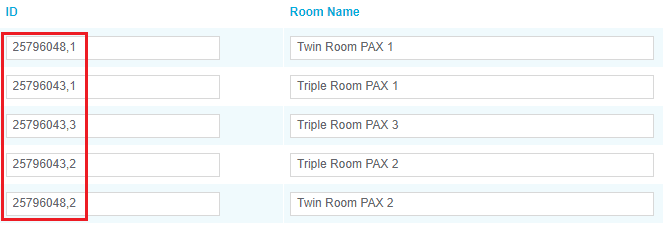
3. Mapping Rules and Constraints
Effective synchronization requires adhering to specific data level constraints:
- Room Level Settings: Allotment, Close to Departure (CTD), and Close to Arrival (CTA) are set at the room level. These settings apply to all associated rate plans.
- Rate Plan Level Settings: Price, Closeout, Minimum Length of Stay (minLOS), and Maximum Length of Stay (maxLOS) are set for specific room and rate plan combinations.
- Allotment Synchronization: Map only one rate plan to send allotment, CTD, and CTA data to avoid synchronization conflicts.
4. Activating the Agoda Channel
Once mapping is complete, activate the channel via the YieldPlanet Dashboard:
- Locate the Channel Health section.
Identify the Yellow Agoda Icon (indicating inactive/pending status).

- Click the icon to trigger activation.
The icon will turn Blue, confirming the channel is active and communicating.

5. Troubleshooting: Missing Historical Reservations
Issue: Reservations confirmed on Agoda before the YieldPlanet connection was established are not appearing in the channel manager.
Technical Explanation:
- System Limitation: YieldPlanet does not retroactively import historical bookings. The sync trigger only applies to reservations made after the connection is finalized.
- Resolution: Manage all pre-connection reservations manually within the Agoda Extranet or your local Property Management System (PMS).
6. Key Terms Summary
- HotelID: The unique identifier for your property on Agoda.
- Occupancy-Based Pricing: A model where price varies based on the number of guests in a room.
- CTD/CTA: Restrictions preventing check-out (Departure) or check-in (Arrival) on specific dates.
- minLOS/maxLOS: Minimum or Maximum duration a guest can stay for a specific booking.