Overview
This article provides instructions for connecting, mapping, and activating the Booking.com Online Travel Agency (OTA) distribution channel within the YieldPlanet Channel Manager system. Connecting Booking.com allows property managers to automatically synchronize inventory, rates, availability, and occupancy-based pricing configurations.
Core Warnings, Limitations & Exceptions
⚠️ CRITICAL LIMITATION: Guest Reviews The YieldPlanet integration does not fetch or receive guest reviews (including review scores or written comments) from Booking.com. Property managers must view and reply to all guest reviews directly within the Booking.com Extranet.
⚠️ CRITICAL LIMITATION: Content Synchronization YieldPlanet does not support Application Programming Interface (API) transmission for property photos, amenities, or descriptions. All visual assets and property description text must be uploaded and updated directly inside the Booking.com Extranet.
⛔ DATA SAFETY EXCEPTION: Mapping Protection Property managers must deactivate data distribution to Booking.com while actively performing room and rate mapping to prevent transmitting incomplete, partial, or corrupt pricing and inventory data to the live marketplace.
Prerequisites
Before initiating the Booking.com integration within the YieldPlanet Channel Manager, the following prerequisites must be met:
Active Accounts: Property managers must possess an active, valid Booking.com Hotel ID and a registered YieldPlanet Account.
Pricing Model Strategy: Determine whether your property utilizes the Standard Pricing Model (prices set per day, regardless of occupancy) or the OBP (Occupancy Based Pricing) model (prices fluctuate based on the specific number of guests per room).
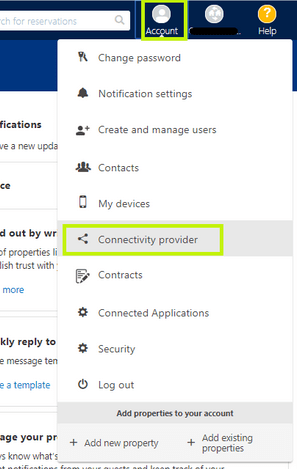
Booking.com Extranet Authorization: The property must explicitly authorize YieldPlanet as the active connectivity provider within the Booking.com partner system by following these instructions:
Log in to the Booking.com Extranet.
Navigate to Account > Connectivity Provider.
Search for and select YieldPlanet as the designated channel manager provider.
Select the requested Connection Type (1-Way or 2-Way) and confirm the request.
Connection Type Optimization (1-Way vs. 2-Way)
For specific synchronization requirements, follow these protocols:
- 1-Way Connection Setup: Activate Availability and Rates first. This sequence ensures all room types and rate plans are mapped before data flow begins, preventing errors with unmapped reservations.
- Booking Retrieval: Enable the Booking Retrieval option only after the YieldPlanet mapping process is finalized.
Steps
Step 1: Channel Visibility and Credentials Setup
Before data can be retrieved, the Booking.com distribution channel must be made visible, and your authentication credentials must be properly saved in YieldPlanet.
Navigate to the Filter and Display Partners section in the YieldPlanet menu. If the Booking.com channel is hidden, toggle its status to visible so it appears in your main distribution list.
Go to the YieldPlanet credential configuration window for Booking.com.
Input your exact Booking.com Hotel ID into the designated
Hotel IDfield.Conditional Syntax Requirement for OBP Properties: If your property uses the Occupancy Based Pricing (OBP) model, you must use a comma-separated syntax suffix in the YieldPlanet credential configuration by adding a comma and the exact word
occupancydirectly after your ID.OBP Credential Suffix Example:
123456,occupancy
Step 2: Protocol Optimization for 1-Way Connections (If Applicable)
If your property is utilizing a 1-Way Connection (where data flows exclusively in a single direction from the extranet to the channel manager), follow this strict sequence to prevent system unmapped reservation errors:
Activate the Availability and Rates components within YieldPlanet first. This protocol ensures your underlying architectural mapping is complete before reservation data flows.
Do not enable the Booking Retrieval option until the mapping process described in Step 4 is fully completed.
Step 3: Retrieving Booking.com Rooms and Rate Plans
To sync your inventory, YieldPlanet must fetch the latest structural data directly from Booking.com.
Navigate to the Partners management screen in the YieldPlanet sidebar menu.
Select Booking.com from your list of connected distribution channels.
Click the Fetch/Retrieve Rooms and Rates button to pull live data blocks from the Booking.com API.
Step 4: Configuring Occupancies (Only for OBP Properties)
Booking.com requires explicit data regarding the maximum number of adults allowed per room category to process pricing updates accurately. YieldPlanet utilizes a comma-separated text syntax modifier during room configuration.
Locate the Booking.com Room ID field during the room retrieval phase in YieldPlanet.
Append a comma (
,) followed by the exact number of included adults directly after the room identification number.OBP Room ID Example: If your room ID is
123456and the price structure applies to a two-adult capacity, enter:123456,2
Step 5: Mapping Booking.com Rooms and Rates
Mapping binds your internal physical room configurations to your live digital listings on the Booking.com platform.
Ensure data distribution is deactivated temporarily to avoid live transmission errors.
Navigate to the Mapping Table screen in YieldPlanet.
Correlate each internal YieldPlanet room type with the corresponding retrieved Booking.com Room ID.
Correlate your internal YieldPlanet rate plans to the matching Booking.com Rate Plan Codes.
Click Save Mapping to register the linkages.
Step 6: Support Team Notification and Channel Activation
Final activation requires manual clearance from YieldPlanet Technical Support and a visual health check on the dashboard.
Contact the YieldPlanet Support Team and submit a notice confirming that the connection request has been initiated within the Booking.com Extranet. This will allow the team to accept the incoming connection.
Explicitly specify your property's pricing configuration in the ticket (Standard or OBP).
Once support provides approval, navigate to the main YieldPlanet Dashboard.
Locate the Channel Health widget section.
Find the Booking.com Icon, which will initially display as Yellow (signifying an inactive or dormant connection link).
Click the Booking.com Icon.
Verify that the icon turns Blue, indicating that the live synchronization link is running.
Troubleshooting
Issue: Missing reservations made before the YieldPlanet connection was activated.
Cause: Pre-connection bookings confirmed on Booking.com prior to live synchronization will not automatically download to your YieldPlanet calendar, presenting an overbooking risk.
Resolution: Submit a manual download request to YieldPlanet Technical Support. You must provide the specific ChannelManager property ID, the Booking Channel ID in YieldPlanet.
Issue: Incomplete data or missing guest info on cancelled bookings.
Cause: If a booking was confirmed and subsequently cancelled on Booking.com before the YieldPlanet sync link fetched it, the API will lack complete user profiles, as the OTA does not send full payloads for historical cancellations.
Resolution: This is normal behavior. Reference the missing details directly in the Booking.com Extranet.
Issue: Accumulation of duplicate or obsolete room mappings.
Cause: Structural modifications over time inside the OTA extranet create loose orphan records.
Resolution: Contact YieldPlanet Support and request a "Mapping Table Cleanup." An agent will wipe obsolete configurations to streamline the interface.
Issue: Checkboxes are grayed out and unselectable in the channel management screen.
Cause: System restrictions or rule conflicts prevent manual overriding.
Resolution: Hover your mouse cursor over the grayed-out checkbox. A dynamic system tooltip will appear explaining the exact business logic rule causing the restriction.
FAQs
Q: How does YieldPlanet manage allotments when 'Max Allotment' is disabled?
A: If a hotel has multiple rate plans (e.g., Best Available Rate [BAR] and Non-Refundable) and the Non-Refundable rate plan is closed, YieldPlanet will continue to transmit the collective allotment at the overall room level. The open/closed statuses are governed at the individual rate plan level, meaning BAR remains open to book from the collective pool while the Non-Refundable rate plan is blocked.
Q: Why are my hotel room photos and descriptions not showing up in YieldPlanet?
A: YieldPlanet does not integrate property descriptions or photos via its API. All rich media content assets must be updated manually within the Booking.com Extranet interface.
Q: What format should I use for my Hotel ID if my property operates on Occupancy Based Pricing?
A: You must format the username configuration using a comma separator and the explicit keyword
occupancydirectly following the numeric code, matching this pattern:YourHotelID,occupancy.
Key Entity List
Product: YieldPlanet Channel Manager
Channel / OTA: Booking.com
System Interfaces: Booking.com Extranet, YieldPlanet Dashboard, Channel Health Widget, Mapping Table
Pricing Components: Standard Pricing Model, Occupancy Based Pricing (OBP)
Status States: Yellow Icon (Inactive/Dormant), Blue Icon (Active/Live Sync)