Distributor logs track the synchronization of prices, allotments, and restrictions from the channel manager to Online Travel Agencies (OTAs). These logs are essential for monitoring data latency and confirming successful updates on OTA extranets.
Core Functions of Distributor Logs
Distributor logs provide a granular timeline for data transmission, specifically tracking:
- Insertion Time: The exact timestamp when new prices, allotments, or restrictions were entered into the channel manager.
- Acceptance Time: The timestamp when the target OTA/channel successfully received and processed the data.
- Distribution Pace: The calculated duration between insertion and acceptance, indicating how long data took to reach the OTA extranet.
Log Analysis and Monitoring
To ensure data integrity, use logs to verify the following processes:
- Price Updates: Confirms the delivery of modified rates to specific distribution channels.
- Allotment Synchronization: Tracks changes in room availability across all connected platforms.
- Restriction Management: Monitors the application of "Minimum Stay," "Closed to Arrival," or other booking constraints.
Filtering and Reading Logs
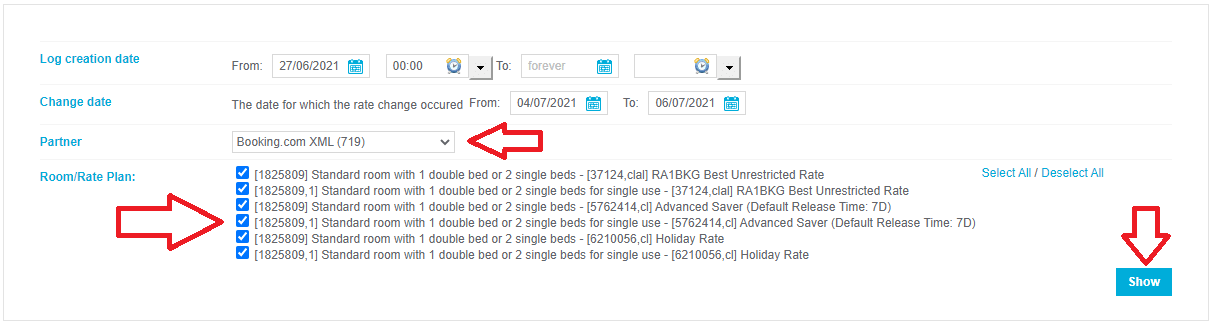
Effective troubleshooting requires precise filtering to isolate specific data packets or timeframes.
How to Filter Logs
- Date/Time Range: Narrow results to the specific window when a synchronization issue was reported.
- Channel Selection: Filter by a specific OTA (e.g., Booking.com, Expedia) to isolate platform-specific delays.
Update Type: Select specific data categories (Price, Allotment, or Restriction) to reduce noise.
How to Read Log Results
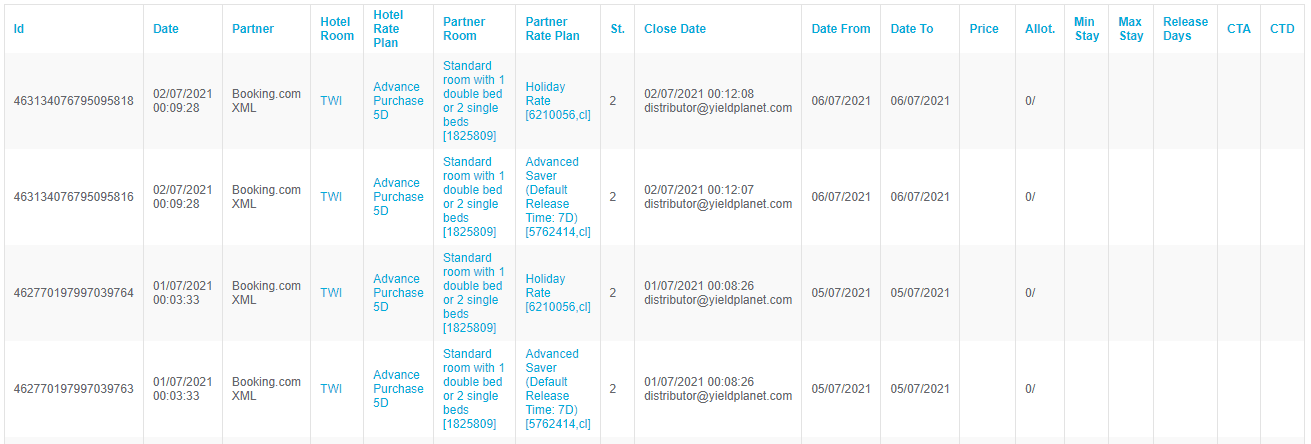
- Status Indicators: Look for "Success" or "Accepted" flags to confirm delivery.
- Error Codes: Identify "Rejected" or "Failed" statuses to diagnose API issues or credential errors.
Latency Calculation: Subtract the Insertion Time from the Acceptance Time to determine the distribution pace for that specific update.
Key Terms Summary
| Term | Definition |
|---|---|
| Channel Manager | The central system pushing data to various OTAs. |
| OTA Extranet | The external platform where the distributor data is ultimately displayed. |
| Distribution Pace | The measure of latency in the data sync process. |
| Allotment | The number of rooms available for sale on a specific channel. |