Overview: Partner Reservations
The Partner Reservations section centralizes data for all bookings registered from active, connected sales channels. It serves as the primary interface for managing guest stays and booking financial data.
Searching and Filtering Reservations
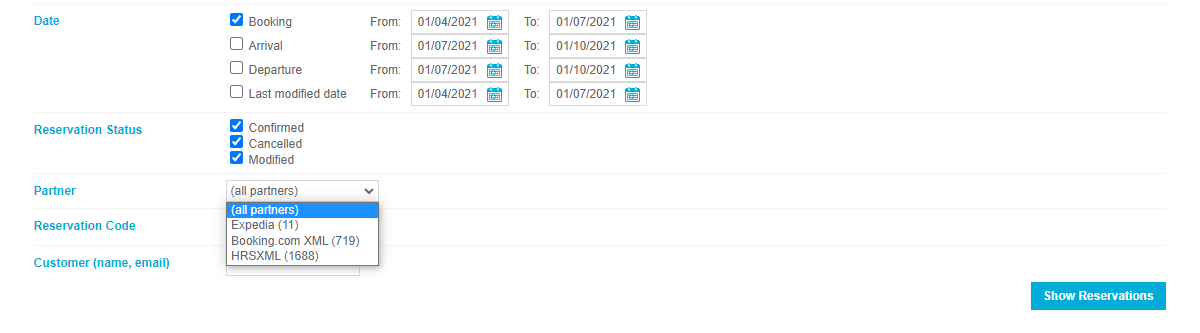
To locate specific bookings within the system, use the following search criteria:
- Date Ranges: Filter by booking or stay dates.
- Reservation Status: View active, cancelled, or pending bookings.
- Channel Name: Filter by the source of the booking (e.g., Booking.com).
- Identifiers: Search by Reservation Code or customer details.
Default View: The system defaults to displaying all statuses filtered by the booking date.
Accessing Reservation Details
Detailed information for each booking is accessible by clicking the Reservation Code in the list or via the confirmation email link. Each reservation record contains:
- Guest Information: Booker and guest details, number of adults/children.
- Stay Details: Stay dates, room types, number of rooms, and nights booked.
- Financials: Commission value, payment type, daily prices, and add-ons.
- Operational Data: Remarks, extra info, cancellation policy, and partner-specific rate plans.

Payment and Credit Card Management
For bookings involving credit cards, the following protocols apply:
- View Credit Cards: Card details are visible within the reservation window for up to 2 days after the check-out date.
- Mark Invalid CC: If a card fails validation (expired, insufficient funds), mark it as Invalid immediately. This must be done by midnight (00:00) on the check-in date. Only valid for Booking.com reservations.
- CC Correction Process: Once reported invalid, the guest receives an SMS/email to update details. Only valid for Booking.com reservations.
- Standard Window: 24 hours to update.
- Last-Minute (within 48h of check-in): 12 hours (or until 3 PM) to update.
- Minimum Grace Period: 2 hours.
- Cancellation: If no valid card is provided within the timeframe, use the Invalid CC/Cancel button to terminate the booking. Only valid for Booking.com reservations. Only valid for Booking.com reservations.
Reporting No-Shows and Misconduct
- No-Show Reporting: If a guest fails to arrive, mark the reservation as "No Show" starting at 00:00 (midnight) on the arrival date and up to 48 hours later. This triggers an automatic cancellation in the source channel (Only valid for Booking.com reservations).
- Guest Misconduct: Report damages or rule-breaking after check-in and no later than 7 days after check-out. Only valid for Booking.com reservations.
- Categories: Payment issues, house rule violations, abusive behavior, property damage, or illegal activity.
- Actions: Assess damages, restrict rebooking, or escalate to the channel partner.
Modifying Stay Parameters
Properties can adjust the following directly within the reservation interface (Only valid for Booking.com reservations):
- Comments: Save internal user comments on specific records.
- Departure/Price: Change the check-out date and update the total price. The system automatically sends a revised confirmation to the guest.
- Printing: Generate physical copies of the reservation via the printer icon.
Key Terms Summary
| Term | Definition |
|---|---|
| Partner Reservations | Centralized dashboard for all channel-synced bookings. |
| Invalid CC | A status indicating a credit card failed validation, triggering a guest update request. |
| No-Show | A guest's failure to arrive on the scheduled check-in date. |
| Misconduct Report | A formal complaint filed against a guest for damages or policy violations. |