Overview: Same-Day Reservation Blocking
The CloseOut Hourly Release feature allows properties to block same-day reservations after a specific hour. This tool is designed for hotels and properties without 24-hour reception services to prevent new bookings from arriving after staff have finished their shifts.
Functionality and Logic
- Automated Room Closure: At the defined release hour, all available rooms for the property automatically close for the remainder of the current day.
- Daily Granularity: Release hours are configurable for each calendar day individually.
- Example Case:
- January 1st: Set to 6:00 PM (Property blocks all new same-day bookings at 18:00).
- January 2nd: Set to 11:00 AM (Property blocks all new same-day bookings at 11:00).
Technical Mechanics: How releaseHours Works
The system evaluates and enforces the releaseHours setting through a continuous backend process rather than a single, one-off event.
- Earliest Execution Window: The
releaseHoursvalue represents the number of hours before midnight on the stay date. It defines the earliest time the room can be auto-closed.- Example: If
releaseHours = 3, the close-out window begins 3 hours before midnight (21:00/9:00 PM) in the hotel's local timezone on that stay date. The system will not close the rooms before this time.
- Example: If
- Hourly Background Job: Once the execution window opens, a background job runs hourly at approximately 4 minutes past the hour (~:04).
- Inventory State Change: During each run, the system identifies any eligible room, rate plan, or stay date where allotment is greater than zero, and forces the status to:
allotment = 0closeOut = true
Persistent Re-Closing and PMS Synchronization
Because the background job runs hourly, it persistently enforces the close-out state:
- If a Property Management System (PMS) or channel manager pushes an XML update that re-opens inventory (allotment > 0) after the initial close-out, the subsequent hourly run will automatically close it again.
- This recurring check explains why transaction logs may show multiple close-out entries on the same evening (e.g., at
21:03and again at22:04).
Queue Cutoff Rules
- Non-Americas Region (e.g., Spain/Europe): Each stay date remains in the processing queue and is eligible for auto-close runs only until SQL server midnight on that calendar day.
- Last Run Attempt: For these regions, the final automated attempt to close inventory is typically the 23:04 (~11:04 PM) run. After midnight, the stay date is removed from the active queue.
Timezone and Synchronization Rules
Configuration values are based on Roman Standard Time (UTC+01:00), covering regions such as Brussels, Copenhagen, Madrid, and Paris.
- Calculation: Values indicate the specific time before midnight (Roman Standard Time) when the system will execute the automatic closure.
Scope: The closure applies to all room types within the property inventory simultaneously.
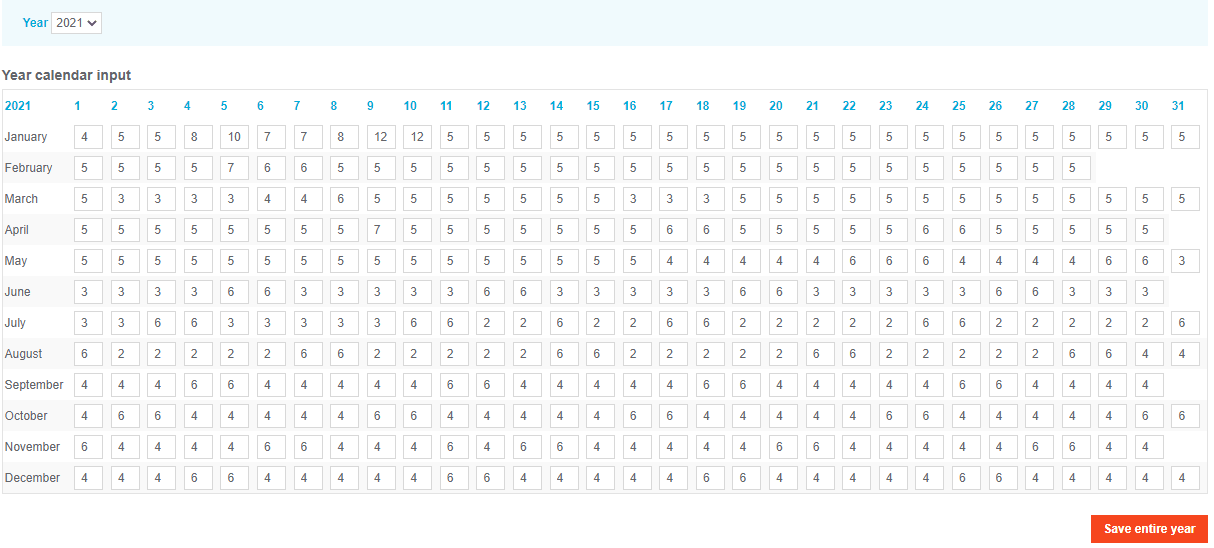
Management Methods
Users can manage hourly release times via two primary methods:
- Individual Entry: Enter specific release hours directly into single-day cells within the calendar view.
Mass Update: Utilize the "Mass Update" tool located beneath the main calendar to apply release hours to a selected range of dates in bulk.

Key Terms Summary
| Term | Definition |
|---|---|
| CloseOut | The process of automatically blocking inventory for new reservations. |
| Hourly Release | A time-based trigger that stops same-day bookings at a specific hour. |
| Roman Standard Time | The reference timezone (UTC+01:00) used for all release calculations. |
| Mass Update | A functionality to apply settings across multiple dates simultaneously. |