Overview and Functionality
The Rate Plan Availability tab is a management interface used to control the sales status of specific rate plans. Its primary function is to provide a high-level overview of open and closed dates at the rate plan level.
Note on Allotment: This section does not display exact allotment values. It only indicates whether a rate plan is active (open for sale) or inactive (closed for sale) for specific dates.
Visual Indicators and Color Coding
The availability table uses specific color codes and symbols to represent the status of a rate plan:
- White (Selected Checkbox): Indicates the rate plan is Open and available for sale.
- Red (Deselected Checkbox): Indicates the rate plan is Closed. The plan has zero availability across all associated room types for these dates.
Yellow: Indicates that No Prices have been assigned to the selected rate plan for these dates. Sales cannot occur without assigned pricing.

Partial Availability Notifications
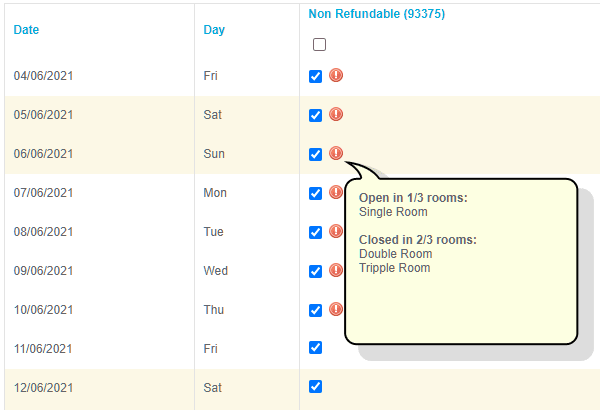
An Exclamation Mark (!) next to a date indicates Partial Availability.
- Meaning: The rate plan is available for some room types but closed for others.
Interaction: Hover the cursor over the exclamation mark to view the specific number of room types that remain available for that date.
Filtering the Availability Table
To refine the data displayed in the table, use the filter bar located above the grid.
- Define specific Dates or Partners.
Click the Show button to apply the criteria and update the table view.

Key Terms Summary
| Term | Definition |
|---|---|
| Rate Plan Level | High-level availability control affecting all room types within a specific plan. |
| Open Date | A date where the rate plan is active and bookable (White). |
| Closed Date | A date where the rate plan is deactivated for all room types (Red). |
| Partial Availability | A status where only specific room types within the rate plan are available (!). |
| Zero Availability | A state triggered by closing a rate plan or lacking inventory. |