The Channel Manager Dashboard provides real-time visibility into distribution channel status, reservation performance, revenue summaries, and system notifications. It serves as the central hub for monitoring data synchronization between the property and connected travel partners.
Core Dashboard Components
- Pending Changes Graph: Tracks data distribution status.
- Channel Health: Monitors active connectivity states.
- Reservations: Displays performance analytics.
- Errors: Logs partner-side synchronization failures.
Pending Changes Graph and Data Synchronization
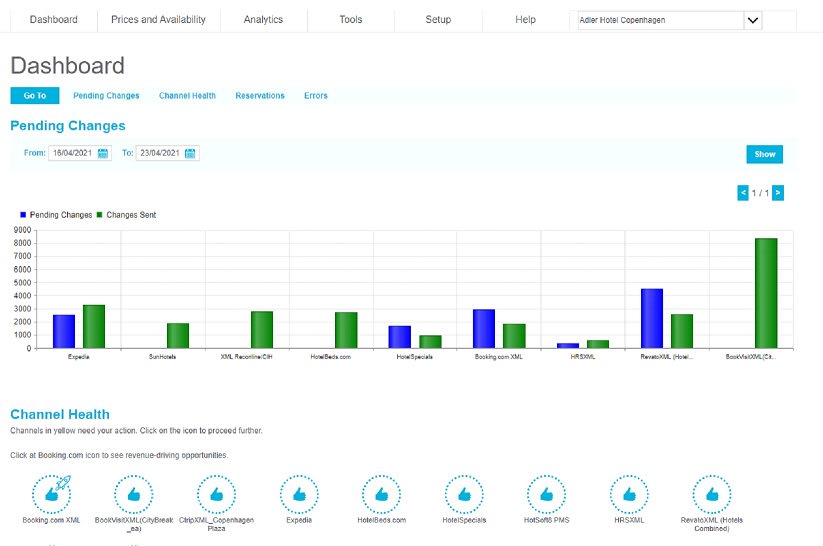
The Pending Changes Graph visualizes the flow of data from the system to distribution partners. It monitors the "waiting for response" stage of the distribution process.
- Green Bars (Accepted): Represents data packets successfully received and acknowledged by the partner.
- Blue Bars (Pending): Represents data currently in the queue awaiting a partner response.

- Navigation: Use the blue directional buttons to view additional screens if the property manages more than ten active channels.
- Date Range: Adjust the calendar above the graph to filter data for specific timeframes.
Channel Health Indicators and Connectivity Status
The Channel Health section uses color-coded icons to represent the live status of partner connections.
Blue Icon (Active): The connection is live. All pricing and availability data synchronize in real-time.
Yellow Icon (Inactive/Ready): The connection is configured but currently disabled. Data updates are NOT transmitted while in this state. Verify all mappings before clicking to activate.
Red Icon / Fire Icon (Error): Indicates a critical connection failure or significant data delay. Users should contact the support team via the Help section immediately.
Rocket Icon (Opportunities): Specific to Booking.com and Airbnb. Clicking this redirects the user to the "Opportunities" section for channel-specific optimization recommendations.
Reservation Statistics and KPIs
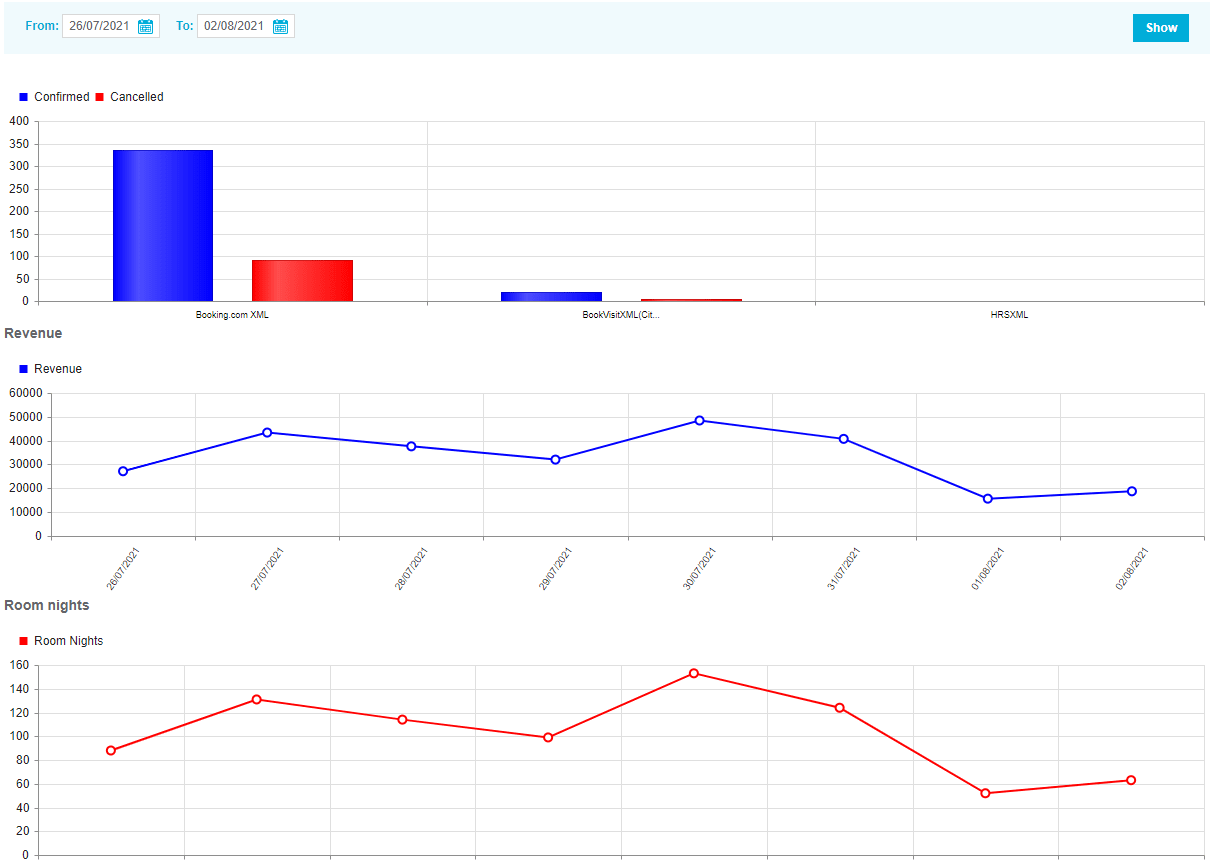
The Reservations section aggregates data from all downloaded bookings to provide key performance indicators (KPIs).
- Confirmed vs. Canceled: Visual comparison of booking volume and cancellation rates.
- Revenue Summary: Total financial performance based on downloaded reservation data.
Room Nights: Total volume of inventory sold across all connected channels.
Error Logs and Synchronization Troubleshooting
The Errors section displays critical notifications and warnings sent by connected partners (e.g., Expedia, Booking.com) regarding failed data transmissions.

Common Error Causes:
- Contracted Allotment: Partner restrictions on minimum inventory levels.
- Structural Inability: Issues such as a closed calendar on the partner side.
- Mapping Failures: Absence of correctly mapped room types or rate plans in the channel settings.
Key Terminology for Retrieval
- Channel Manager: The system used to distribute rates and inventory to OTA partners.
- Mapping: The process of linking internal room/rate types to the partner's equivalents.
- OTA (Online Travel Agency): External partners like Booking.com, Airbnb, or Expedia.
- Synchronization: The real-time transfer of data between the system and the channel.