Overview and Management
Definition and Purpose
Price Grids are predefined, ready-to-use rate structures within the Channel Manager. They represent the most advanced method for rate management, offering maximum flexibility by allowing users to bypass fixed relations between rooms and rate plans (e.g., standard formulas).
Key Features and Limits
- Flexibility: Grids allow for independent rate application, ignoring predefined room-to-rate dependencies.
- Capacity: A maximum of 30 different price grids can be active within any defined period.
- Efficiency: Designed for swift price updates by toggling between pre-configured variants of a price list.

Editing and Adjustment
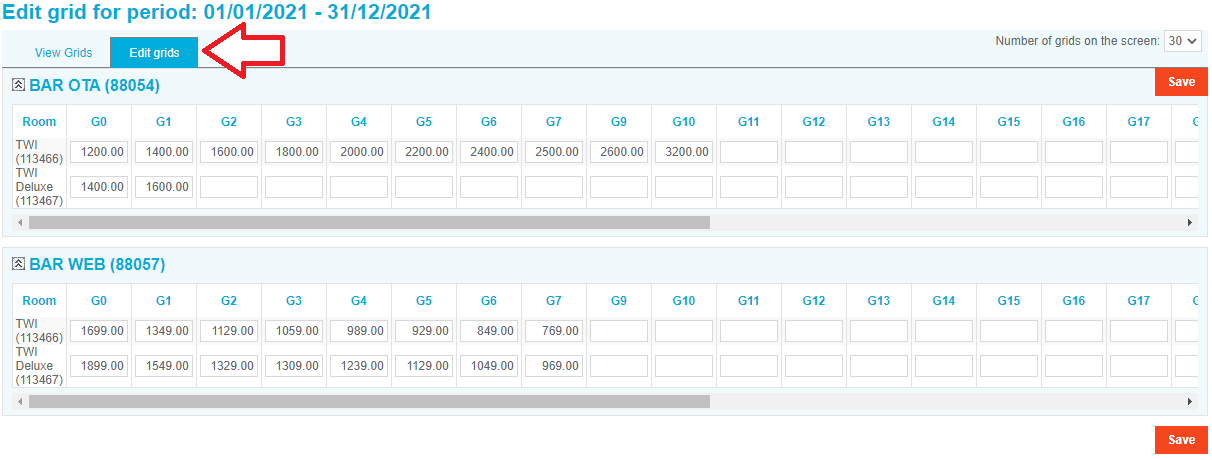
Users can modify existing price structures via the Edit Grids section in the Channel Manager interface. This allows for real-time adjustments to predefined rates.
Data Portability: Export and Import
To manage bulk updates outside of the system:
- Export: Download current grid pricing into an Excel file.
- Update: Modify rates locally within the spreadsheet.
- Import: Upload the updated Excel file back into the Channel Manager to synchronize prices.


Critical Requirement: When editing via Excel, do not modify the file formatting. Changing the structure or format will cause import failures.
Implementation
To activate grid prices and put them into effect, refer to the Update Prices Using Grids section of the manual.
Key Terms Summary
- Price Grid: A predefined matrix of rates for quick application.
- Fixed Relations: Standard dependencies between rooms and rates (Formulas).
- Grid Limit: 30 grids per period.
- External Management: The process of Exporting/Importing via Excel for bulk edits.